Gallery Organizer: What the Cozy Art Sim Is and What PC You Need
What Gallery Organizer is, how its painting-sorting gameplay works, its release status on Steam and the PC specs you need to run it as of October 2026.
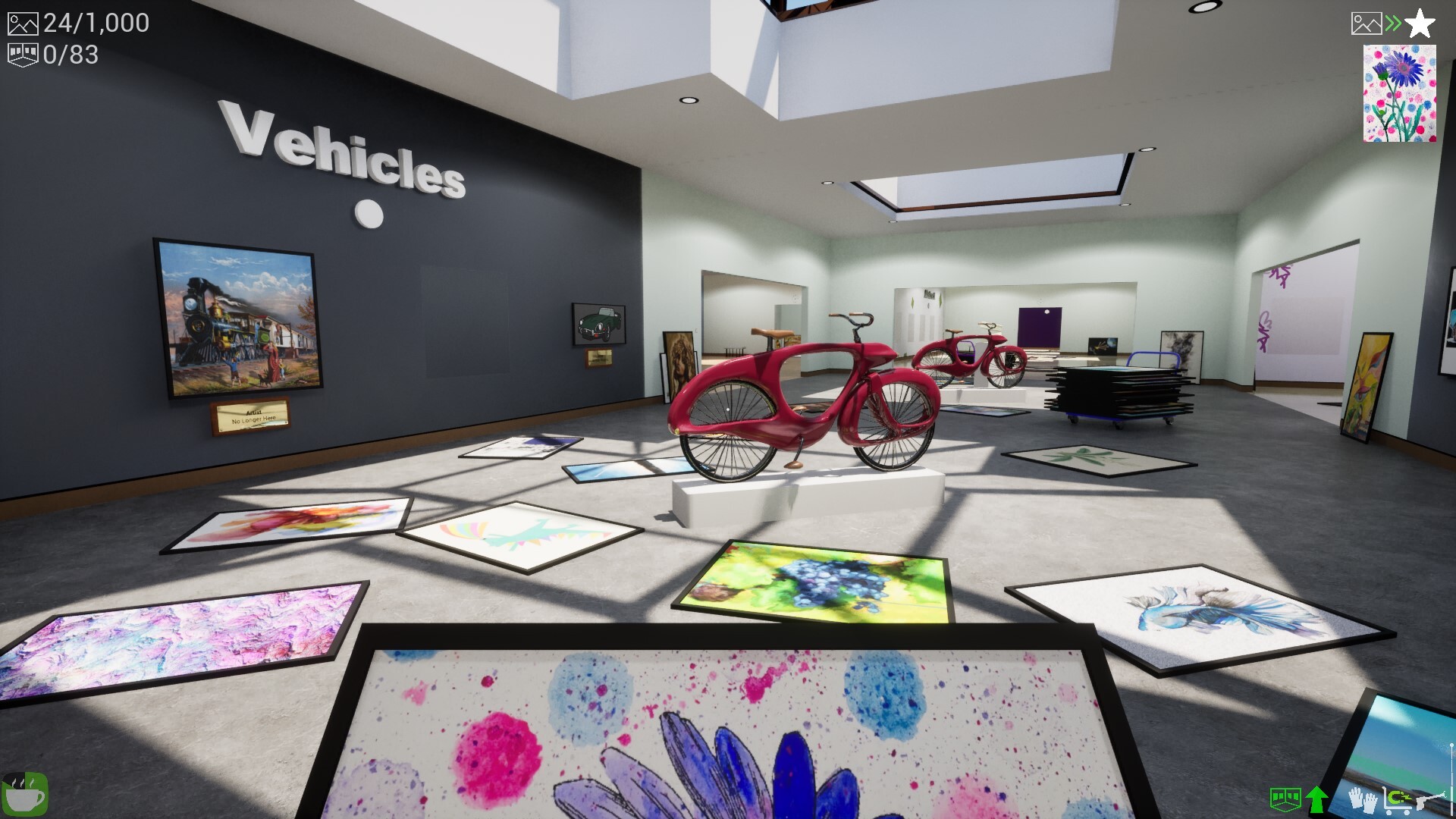
Gallery Organizer is a cozy organizing sim from 7D Games Studio. You sort and hang up to 1,000 paintings by real artists in a messy, procedurally generated art gallery, with no timer. It just shot up Steam’s charts because its listed launch date is October 14, 2026. Below we cover how the game plays, what’s confirmed so far and what PC hardware you need to run it.
What is Gallery Organizer?
The Steam store page calls Gallery Organizer a relaxing organizing simulator. You arrive at a cluttered gallery and turn it into a curated exhibition. You sort paintings into themed exhibition rooms, then arrange them however you like within each room.
It belongs to the same “tidy things up” family as other cozy organizing games on Steam. The difference is the subject: instead of stacking household items, you’re curating artwork. Steam’s user tags for the game include Organizing, Cozy, Relaxing, Collectathon and Puzzle.
Key facts at a glance
| Detail | What the sources say (as of October 2026) |
|---|---|
| Developer / publisher | 7D Games Studio |
| Platform | PC (Windows) via Steam |
| Listed Steam release date | October 14, 2026 |
| Gallery size | From about 100 paintings up to 1,000 |
| Time pressure | None |
| Artwork | Paintings by real artists |
How the gameplay works
The game’s description is short, but it’s specific enough to get a clear picture of the loop.
Sorting paintings into rooms
Each gallery is procedurally generated, so the layout and the mess you start with change from run to run. Your main job is to figure out which paintings belong together and move them into the right themed exhibition rooms. That’s where the puzzle element comes from: you’re reading the artworks and grouping them sensibly.
Arranging each room
Once paintings are in the right room, you can arrange them freely within it. There’s no “correct” pixel-perfect wall layout described in the store copy, so the hanging phase looks more like self-expression than a test.
Picking your scale and difficulty
You choose gallery size and difficulty yourself. The store page gives two ends of the range:
- Local Exhibition: a smaller gallery with around 100 paintings
- World Expo: a large show with up to 1,000 artworks
With no time pressure, you can play a small exhibition in a short session or work through a large expo over several evenings.
Extras
The Steam listing also mentions a choice of soundtracks, plus the option to put together your own hand-picked art collections from the paintings you come across.
Where the art comes from
The game uses real artwork. According to Steam, the paintings come from royalty-free collections and from works generously donated by their owners. That’s worth knowing if you’re expecting famous copyrighted modern pieces, because the store page doesn’t say which artists or collections are included. We couldn’t find an official list of the artists featured.
Release date and availability
This is where the sources don’t fully agree, so here’s what each one says:
- Steam lists the release date as October 14, 2026. Some cached copies of the store page still showed the “not yet available” notice for unreleased games, while others showed it as released. A store page title we saw also referenced a 15% discount, which usually points to a launch offer, but we couldn’t confirm the price or how long it lasts.
- 7D Games Studio’s website had earlier said “Releasing Q3 2026” and now shows the game as available on Steam.
- IsThereAnyDeal listed a September 9, 2026 release date and recorded a Steam public-branch update on October 14, 2026.
- GG.deals had no confirmed release date and no store listing when we checked.
The most reliable reading is that the game went live on Steam around October 14, 2026, which matches the sudden spike in searches. Store data and price trackers can lag behind for a day or two, so the Steam page is the place to check the current status and price.
How to get it the official way
- Open the Gallery Organizer Steam page in the Steam client or a browser.
- Check the purchase box for the current price and any launch discount.
- If it still shows as upcoming in your region, add it to your wishlist so Steam notifies you when it’s available.
- Before buying, compare your PC with the system requirements below.
Steam is the only storefront named in the official sources. Avoid sites offering “free downloads” of the game. They aren’t official and can put your PC at risk.
Gallery Organizer PC requirements
Since this is a hardware site, here’s the part you came for. The Steam listing gives both a minimum and a recommended tier, and both are Windows-only.
| Component | Minimum | Recommended |
|---|---|---|
| OS | Windows 10 or later | Windows 10 or later |
| CPU | Intel Core i5 or AMD Ryzen 5 (2017 or newer) | Intel Core i5 or AMD Ryzen 5 (2019 or newer) |
| RAM | 4 GB | 8 GB |
| GPU | NVIDIA GeForce GTX 1050 Ti or AMD Radeon RX 560 | NVIDIA GeForce RTX 3060 or AMD Radeon RX 6700 XT |
| Storage | Not specified in our sources | 3 GB |
What this means for your hardware
- Older or budget desktops: a GTX 1050 Ti-class card and 4 GB of RAM meet the minimum, so most gaming PCs from the last several years should launch the game.
- The recommended GPU tier is surprisingly high for a cozy sim. Our guess is that the big 1,000-painting galleries are behind it, since that’s a lot of high-resolution art on screen at once. The developer hasn’t explained the choice, so treat that as our reading rather than a confirmed reason.
- Laptops: if your laptop has a dedicated GPU around GTX 1050 Ti level or better, you meet the minimum. Integrated graphics aren’t listed in either tier.
- Storage: at 3 GB, the install is small. Any SSD will make loading big galleries smoother than an old hard drive, though the developer doesn’t require one.
Steam Deck, Mac and consoles
We found no official information on Steam Deck verification, a macOS version or console releases. The only platform in the sources is Windows PC on Steam. If handheld play matters to you, keep an eye on the Steam page’s Deck compatibility section, which Valve updates after testing.
Is it worth a look?
If you enjoy slow, satisfying organizing games, or you like art and want a low-stress way to spend time with it, Gallery Organizer’s pitch is clear: no timer, flexible gallery sizes and real paintings to curate. Because it only just launched, there’s no meaningful pool of reviews yet. We’d give it a few days for player reviews to come in on Steam before deciding, unless the launch discount tempts you.
We’ll update this guide as 7D Games Studio publishes patch notes or platform news. All details above are as of October 2026 and may change.
Free apps worth trying
SponsoredSponsored links. Installing through them can earn us a commission, at no cost to you. Apps are free to download; some offer optional in-app purchases.
Frequently asked questions
Is Gallery Organizer out yet? +
Steam lists October 14, 2026 as the release date, and the developer's site says the game is available on Steam. Some cached store data still showed it as an upcoming title, so check the Steam page itself to see whether you can buy it.
Who makes Gallery Organizer? +
It is developed and published by 7D Games Studio, according to its Steam listing and price trackers such as IsThereAnyDeal and GG.deals.
Are the paintings in Gallery Organizer real artworks? +
Yes. The Steam page says the paintings are by real artists, sourced from royalty-free collections and from works donated by their owners.
Do I need a gaming PC to play Gallery Organizer? +
Not a high-end one. The minimum specs list 4 GB of RAM and a GeForce GTX 1050 Ti or Radeon RX 560 on Windows 10 or later. The recommended tier asks for 8 GB of RAM and an RTX 3060 or RX 6700 XT.
Is Gallery Organizer on Steam Deck, Mac or consoles? +
The store listing only gives Windows system requirements, and we found no official word on Steam Deck verification, macOS or console versions. Check the Steam page for updates.
Sources
- Gallery Organizer on Steam (store.steampowered.com)
- 7D Games Studio (7dgames.studio)
- Prices - Gallery Organizer - IsThereAnyDeal (isthereanydeal.com)
- Gallery Organizer - All platforms - GG.deals (gg.deals)